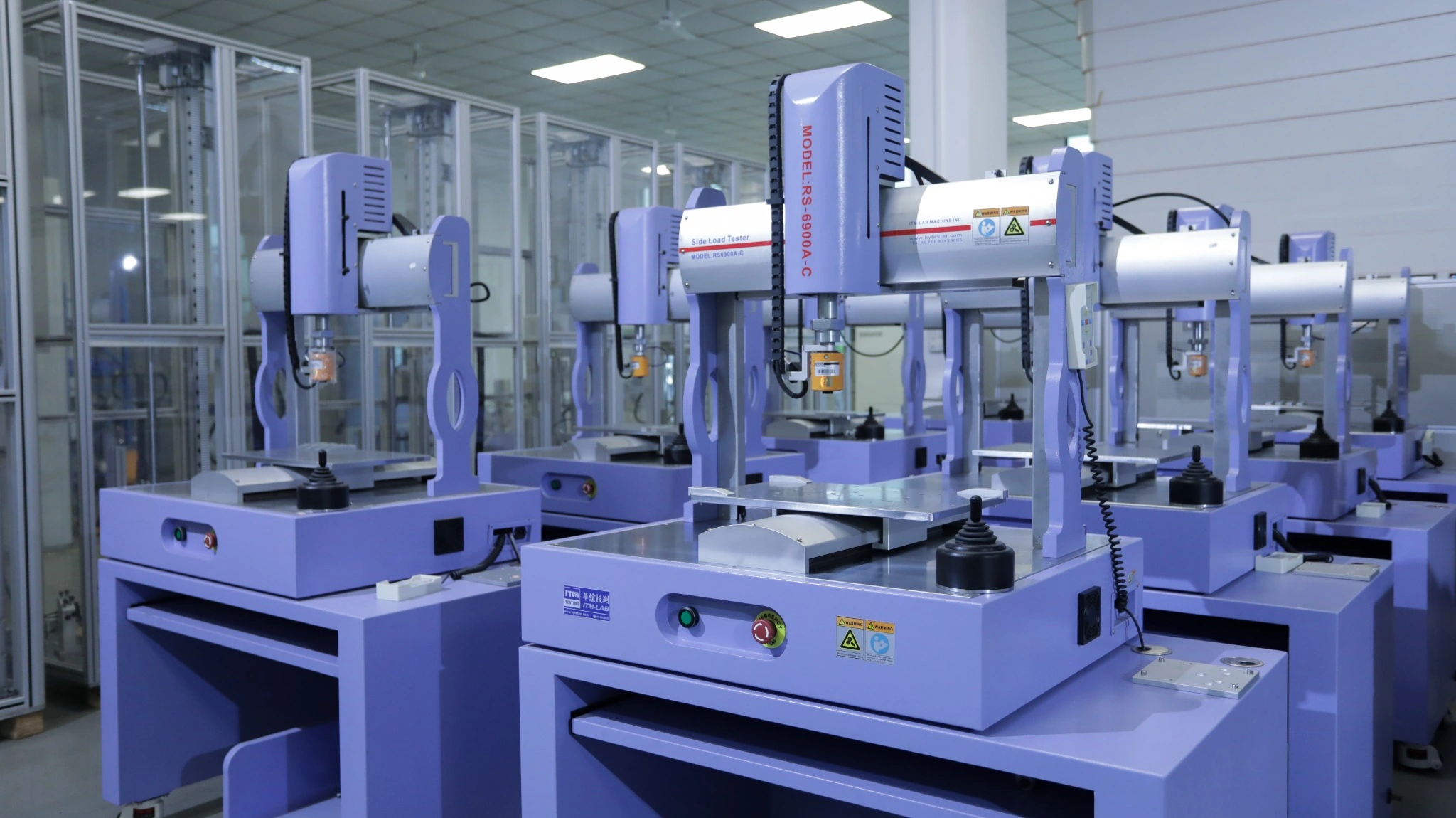
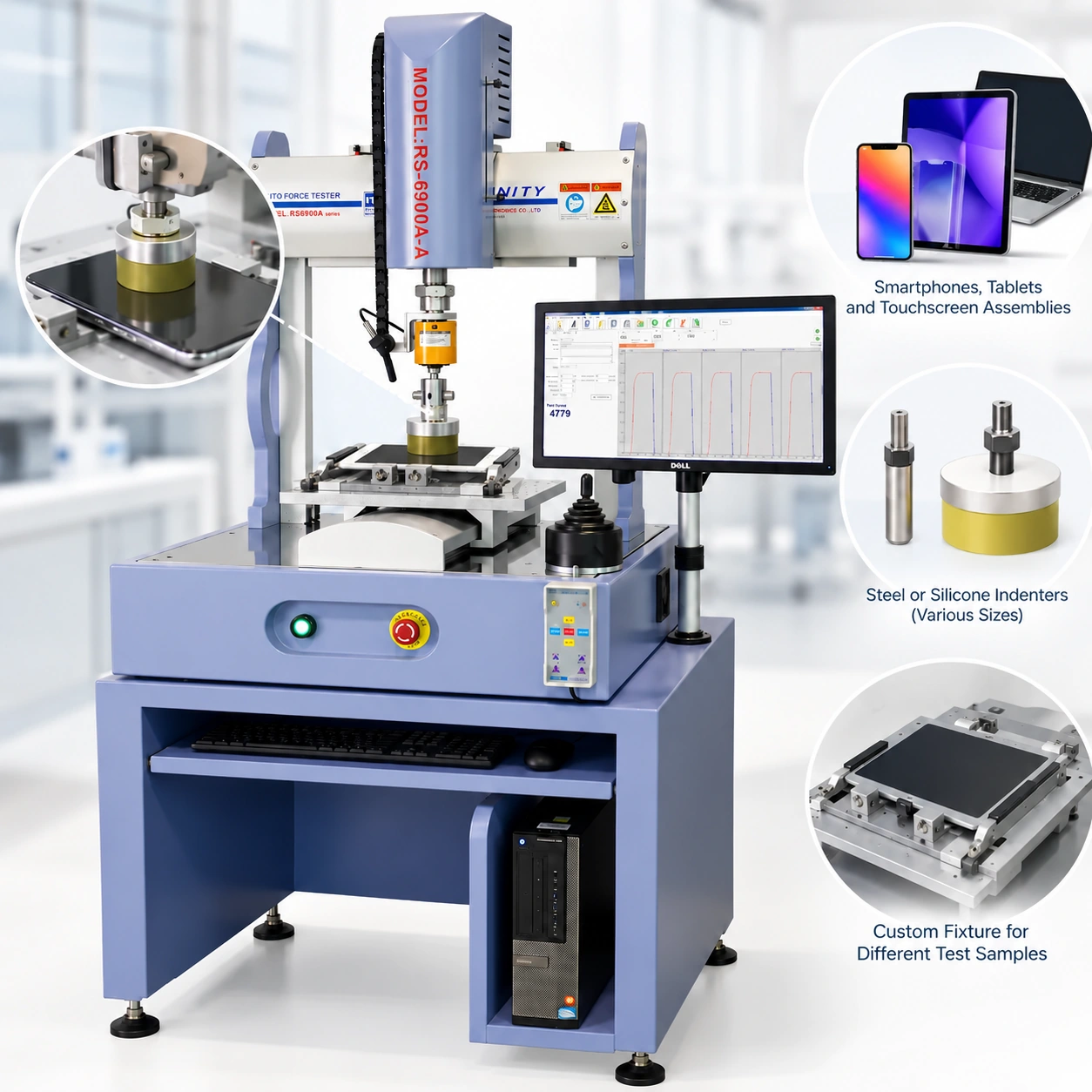
Test-point planning, probe selection, force measurement and automatic XYZ testing with the ITM-LAB RS-6900A
A touchscreen does not necessarily respond to an applied load in the same way at every position. The center of a panel, an area near its frame and a location above an internal support can behave differently, even when the same force is applied.
For engineers evaluating smartphones, tablets and display assemblies, this raises a practical question: how can measurements taken at different positions remain comparable?
The answer starts with a defined test method. Contact geometry, sample support, loading conditions and test-point coordinates all need to be considered before the first measurement is made.
This guide examines the engineering decisions behind multi-point force testing and uses actual ITM-LAB RS-6900A equipment, software and test records to illustrate how an automatic XYZ force testing system operates.
Why One Test Position May Not Tell the Whole Story
A single-point measurement provides information about one specified location. It does not necessarily describe the mechanical response of an entire touchscreen or assembled electronic product.
The response of a display assembly can be influenced by its construction, support arrangement, adhesive layers, cover material and contact position. A test performed near the center may therefore produce a different result from one performed closer to the supporting frame.
Multi-point force testing allows engineers to evaluate a defined series of locations under consistent test conditions.
The objective is not simply to increase the number of measurements. It is to understand how the product responds at positions that matter to its design, reliability or customer acceptance requirements.
Single-Point and Multi-Point Testing
Single-point testing is useful when the requirement concerns a specific location, such as a designated button, component or structural area.
Multi-point testing is more appropriate when several positions must be evaluated using the same measurement procedure. For example, an engineer may need to compare the force response of a display assembly at its center, along selected edges and at other customer-defined coordinates.
An automatic XYZ testing system can execute a programmed sequence of test positions, reducing the need to reposition the sample manually between measurements.
Important: Sequential multi-point testing is not the same as applying force to several positions simultaneously. The required loading arrangement must be confirmed before equipment and fixtures are selected.
Building a Repeatable Multi-Point Test
Reliable force measurement depends on more than the capacity of the testing machine. The probe, fixture, sample position and loading procedure all influence the result.
Before configuring the equipment, engineers should establish the following conditions.
Define the Test Positions
Test locations should be selected according to the product's construction and the purpose of the evaluation.
A smartphone cover glass, a complete touchscreen module and an assembled tablet may require different measurement layouts. The coordinates should therefore be defined using the actual sample dimensions, structural features and applicable customer procedure.
For repeated testing, the same coordinate system should be used across samples.
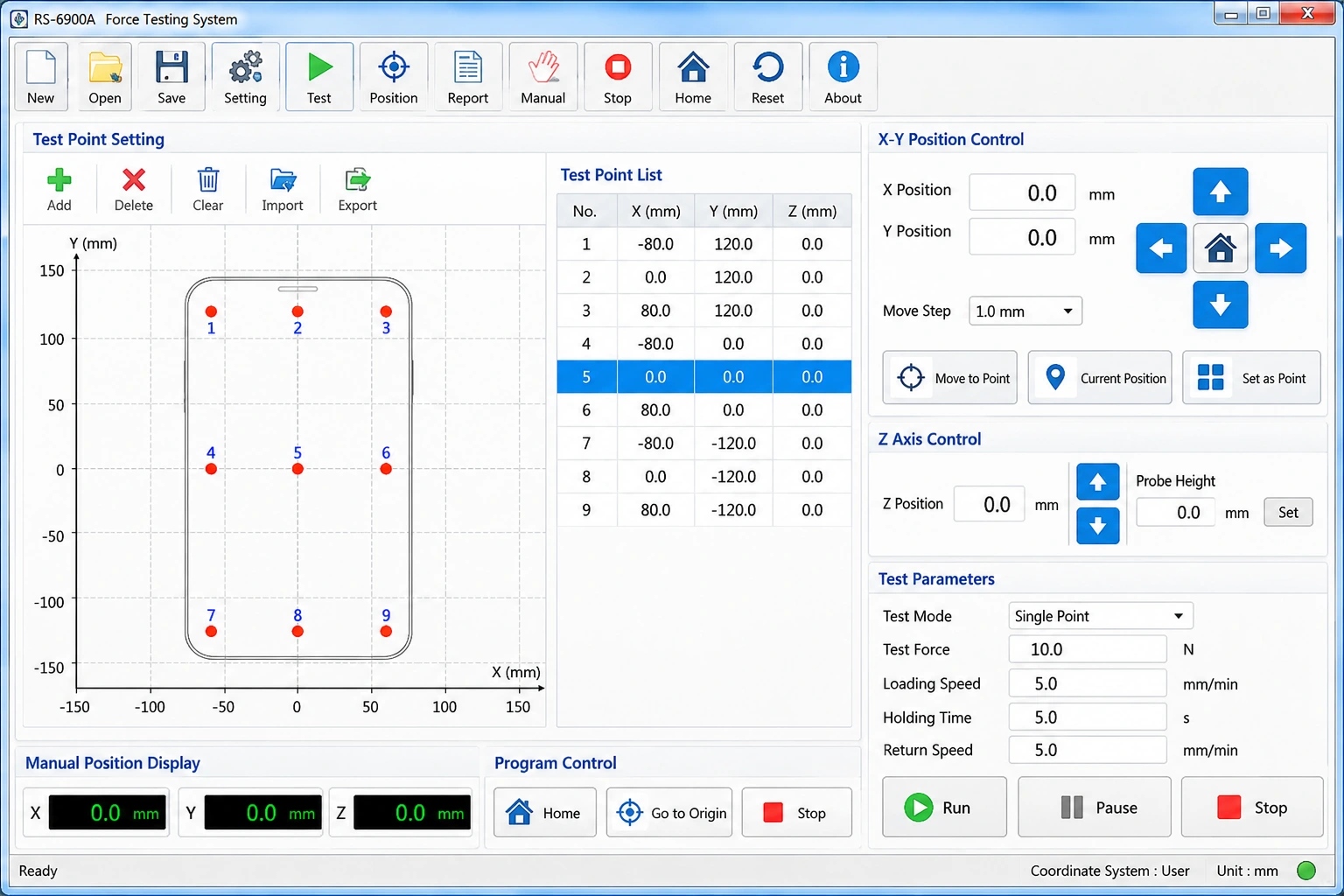
The RS-6900A software supports X-Y coordinate setting and programmed test-point positioning. Once the required positions have been established, they can be included in the test method.
Select the Probe and Support Fixture
Probe geometry determines how the applied load is transferred to the test surface.
A small contact area and a larger silicone contact pad do not create identical loading conditions, even when the measured total force is the same. Probe material, diameter, contact shape and hardness must therefore be selected according to the test objective.
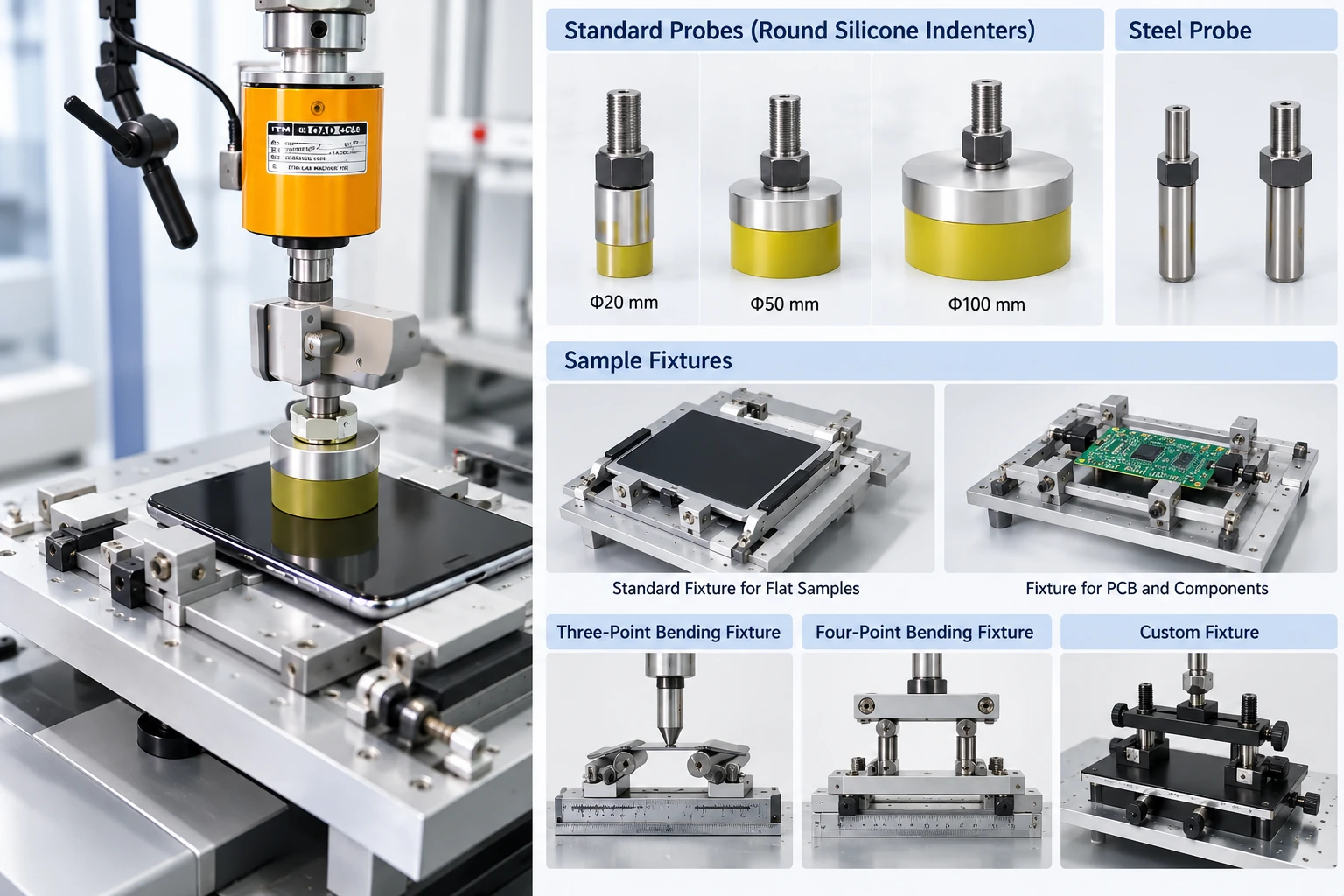
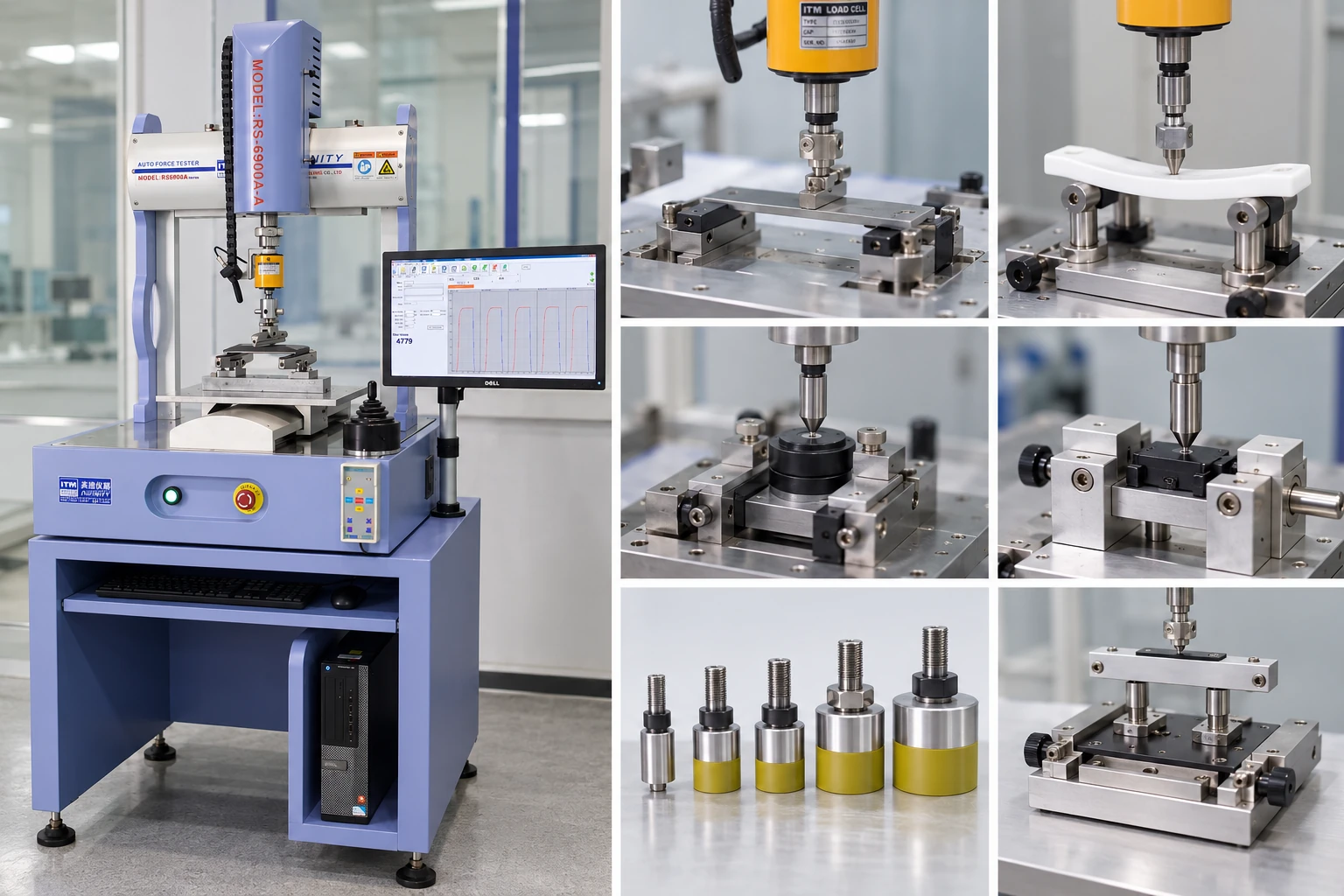
ITM-LAB offers different probe and fixture configurations for the RS-6900A, including steel pressing heads and round silicone indenters for specified applications.
Available configurations shown in the equipment documentation include round silicone indenters with nominal diameters of 20, 50 and 100 mm, as well as other application-specific pressing arrangements. The documented silicone configuration specifies Shore 80 hardness.
These are configuration options rather than interchangeable test conditions. The appropriate contact geometry must be confirmed against the required test procedure.
Sample support is equally important. A panel held along its edges may behave differently from one supported across a larger area. The fixture should maintain the intended boundary conditions without introducing unintended movement during loading.
Establish the Loading Conditions
A meaningful multi-point test requires a consistent loading procedure.
Depending on the application, the method may specify a target force, loading speed, holding time, displacement limit or repeated loading sequence.
For holding-force testing, the recorded curve can help engineers examine how the applied force changes during loading, the holding period and unloading.
The acceptance criteria should come from the applicable product specification, validated internal procedure or customer requirement. A value suitable for one touchscreen assembly should not automatically be applied to another product.
Inside an Actual RS-6900A Test
The ITM-LAB RS-6900A combines automatic positioning with a vertical force measurement arrangement. Once the test coordinates and loading conditions have been established, the system can execute the configured measurement sequence.
The following footage shows an actual keyboard force testing application using the RS-6900A.
Although the test object differs from a touchscreen assembly, the video provides a direct view of the machine's positioning, loading arrangement and operation.
For smartphone and touchscreen projects, the test probe, sample support and software method must be configured according to the relevant product requirements.
The keyboard demonstration illustrates the equipment's operation; it should not be treated as a validated touchscreen test procedure.
Understanding the Force Curves and Test Results
A force value alone may not provide enough information to understand how a component responds during testing.
Depending on the selected method, force-displacement or force-time records can help engineers evaluate loading behavior, peak force, force retention and changes during unloading.
For a holding-force test, the curve typically contains three recognizable stages:
-
Loading: Force increases as the probe contacts and loads the sample.
-
Holding: The system maintains the specified test condition for the programmed duration.
-
Unloading: The applied force decreases as the loading sequence ends.
The actual curve shape depends on the sample, fixture, control method and test settings.
Actual Holding-Force Measurement
The following ITM-LAB software record shows repeated holding-force measurements performed using the RS-6900A.
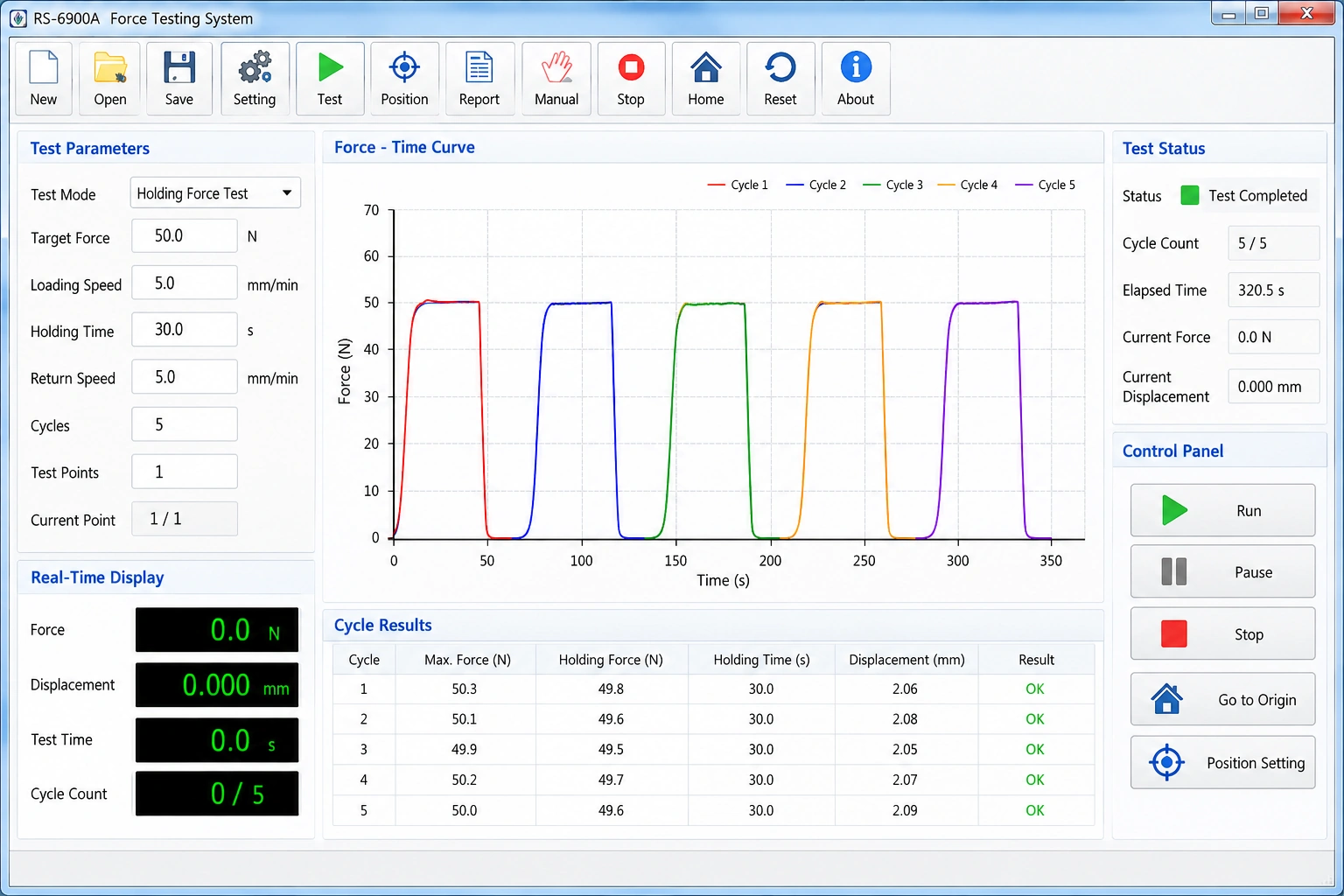
The software records measurement results and presents the data for subsequent review. The example demonstrates the reporting capability of the system; its numerical values are not universal acceptance limits for smartphones or touchscreens.
From Measurement to Test Report
For production quality control and reliability evaluation, traceable records are important.
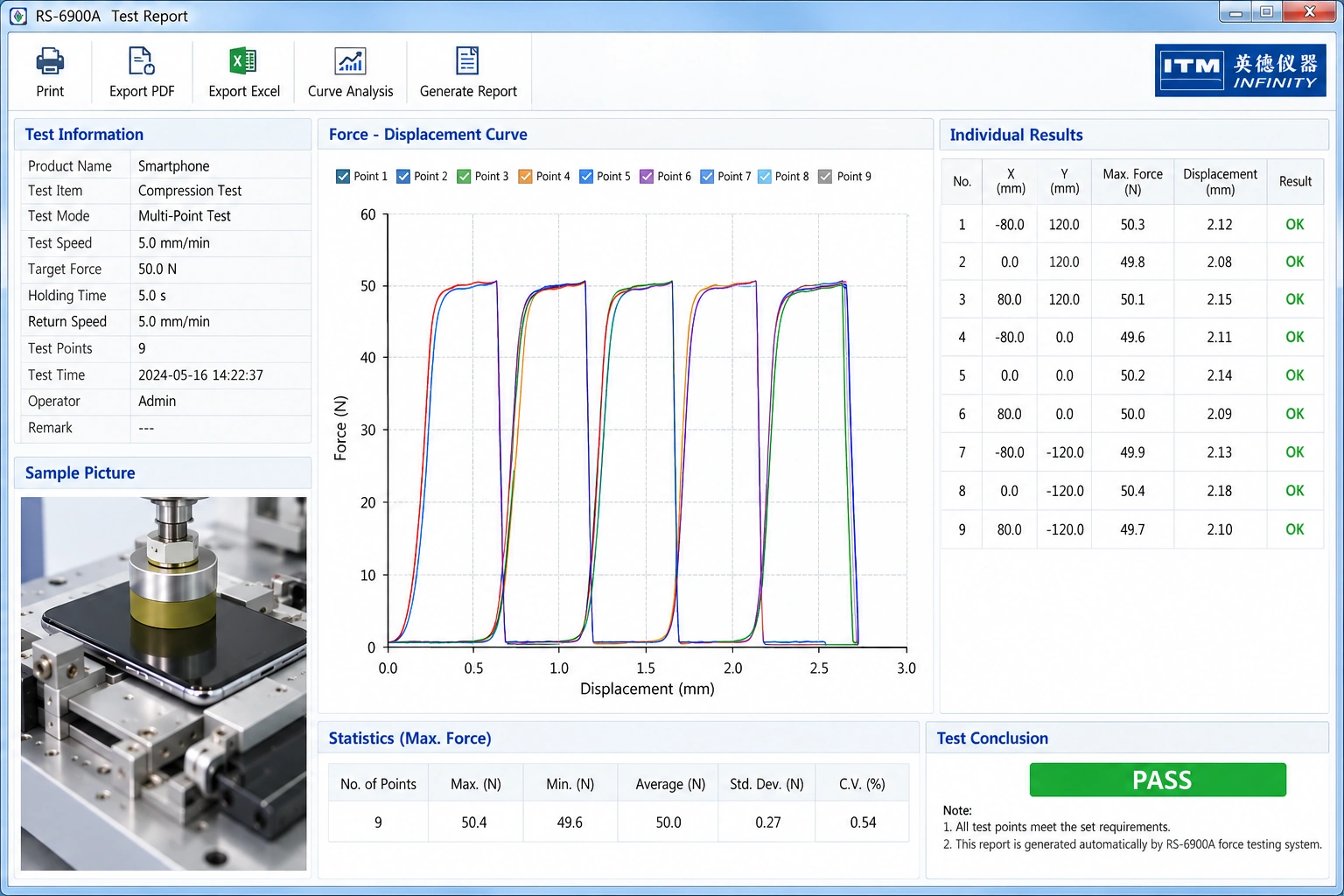
A useful report should identify the sample, test method, measurement conditions and recorded results so that the data can be reviewed against the specified acceptance criteria.
The RS-6900A documentation includes a test report format presenting measurement results and corresponding curves for individual test records.
Beyond Touchscreens: Other Force Testing Applications
The RS-6900A is a configurable force testing platform rather than a machine restricted to one product type.
With the appropriate test method, force sensor and fixture arrangement, it can be configured for different electronic component applications.
| Application | Typical Measurement Objective |
|---|---|
| Smartphone and touchscreen assemblies | Defined-position loading and holding-force evaluation |
| Buttons and keys | Actuation force and force-displacement behavior |
| Electronic components | Application-specific loading and force measurement |
| Connector assemblies | Specified force measurement with an appropriate fixture |
| Glass and panel materials | Bending evaluation using a suitable support and loading arrangement |
Three-point and four-point bending fixtures are application-specific configurations. They should not be confused with multi-point holding-force testing, which evaluates loading at multiple designated test positions.
Choosing the Right XYZ Force Testing Configuration
When selecting an automatic force testing machine, maximum capacity is only one consideration.
A suitable system must accommodate the sample, reach every required test position, provide an appropriate force measurement range and support the specified loading procedure.
For the standard RS-6900A configuration, the documented travel and capacity values are:
| Parameter | RS-6900A |
|---|---|
| X-Axis Travel | 300 mm |
| Y-Axis Travel | 300 mm |
| Z-Axis Travel | 150 mm |
| Standard Z-Axis Capacity | 100 kgf |
| Displacement Resolution | 0.001 mm |
| Displacement Accuracy | ±0.03 mm |
Configuration and measurement specifications should be confirmed against the current technical quotation. Machine capacity does not represent the accuracy or usable measurement range of every available force sensor.
What Should Be Confirmed Before Ordering?
For smartphone and touchscreen applications, the following information will help determine whether the RS-6900A and the proposed fixture arrangement are suitable.
| Requirement | Information to Provide |
|---|---|
| Product | Smartphone, touchscreen, cover glass, display module or other assembly |
| Sample Dimensions | Width × depth × height |
| Test Positions | Number and coordinates of required measurement points |
| Test Method | Loading, holding-force, cyclic or other specified procedure |
| Expected Force | Working range and maximum anticipated force |
| Contact Geometry | Probe shape, diameter, material and hardness, if specified |
| Fixture | Sample support arrangement, photos or technical drawings |
| Test Records | Required curves, measurement results and report format |
For larger samples or applications requiring an extended positioning range, ITM-LAB also offers the RS-6900A2 configuration. The appropriate model should be selected according to actual sample dimensions, test-point coordinates and fixture clearance—not machine size alone.
Which Testing Standards Apply?
There is no single universal force threshold or test-point layout that applies to every smartphone and touchscreen assembly.
The appropriate procedure depends on the component, intended failure mode, product specification and customer requirements.
For example, a panel bending test and a multi-point holding-force test evaluate different mechanical conditions. A bending standard should not be presented as the governing method for a holding-force measurement unless its scope and prescribed procedure genuinely match the application.
Before selecting the equipment, confirm:
-
The applicable product or customer specification and its revision.
-
The required test object and sample preparation.
-
Probe geometry, support conditions and loading procedure.
-
Measurement parameters and acceptance criteria.
-
Any calibration or traceability requirements applicable to the measurement system.
ITM-LAB can review the supplied test procedure and help determine the required equipment and fixture configuration.
FAQ
- Can the RS-6900A test several positions automatically?
Yes. The RS-6900A supports programmed X-Y positioning for a defined sequence of test locations. The required coordinate layout and measurement procedure must be configured for the actual sample.
- Does multi-point testing mean applying force to several points at once?
Not necessarily. Sequential multi-point testing measures a series of designated locations. Simultaneous loading requires a different loading arrangement and should be specified separately.
- Can different probes be used for touchscreen force testing?
Different pressing heads and fixture configurations are available. The appropriate probe geometry, material and hardness depend on the required contact condition and test procedure.
- Can the machine be used for button force and bending tests?
The RS-6900A supports different application-specific force testing configurations. Button testing and bending applications require the corresponding method and suitable fixtures. Optional fixture requirements should be confirmed when requesting a quotation.
- What information is needed for a customized quotation?
Please provide your sample dimensions, expected force range, test-point layout and testing procedure. Product photographs or drawings are especially useful when a custom fixture is required.
Configure Your RS-6900A for the Actual Test
Tell Us What You Need to Test.
Whether your project involves smartphone assemblies, touchscreen modules, buttons or other electronic components, the ITM-LAB team can help review your testing requirements and recommend a suitable machine and fixture configuration.
Share your sample dimensions, expected force, test positions and applicable testing procedure. If available, attach a product drawing or fixture reference.
Request a Test Configuration & Quotation